



Tampilkan postingan dengan label Apps. Tampilkan semua postingan
Next Launcher 3D v1.29 APK


Next Launcher 3D play.google.com.nextlauncher
At the end of 2012, we have a surprise for you! Next Launcher, designed by GO Dev Team, is officially released now!
Next Launcher is a new launcher application
which is full of glorious 3D elements and dynamic effects. Fancy 3D
visual elements, gorgeous transition effects and humanized gestures
bring you a unique and splendid operation experience and visual
enjoyment.
Features:
- Various operation for icons: icons support rotation, reset, select, align and so on. Operation is easy and fantastic.
- Unlimited screen layout: placing icons or widgets randomly which forms your own home screen.
- Stereoscopic screen preview: lots of screen display effects, dazzling animation of screen switching about adding or deleting screen.
- Quick screen management: adding different kinds of elements in screen edit including application icons, folders and widgets. It’ll support changing wallpapers and themes soon.
- Rotatable dock: inverting upward or downward the Dock can quickly switch among home screen, screen edit and screen preview.
- Powerful app drawer: icons can be arranged by names or by time, and folders can be created by overlaying icons. Batch mode and operation of adding apps to screen are also available.
- Beautiful scrolling effects: a variety of app drawer scrolling effects that provide a distinctive screen switching experience.
- Fancy 3D widgets: 3D widgets that are based on Next Launcher are coming soon!
Tips:
- Please make sure your device has installed Google Play.
- Phone performance:Android 2.3.3 and up; Dual-core models is better.
- Suggestion:Watch the video of Next Launcher first, to know about the cool operation of the product.
- Notice: We suggest users which use Galaxy Nexus don't remove the Menu icon.
- (New) Support replacing icons with GO Launcher themes (Long press icon on homescreen -> Change icon -> Select theme)
- (New) Support replacing icons on the Dock bar(Long press icons -> Change icon -> Select icons)
- (Fixed) Some FC bugs
Screenshots :


- Remove license verification with Lucky Patcher or
- Install and run with modded Google Play by ChelpuS
Tag :
Apps,
Battery Booster (Full) v6.2 APK
 Battery Booster - Boost Your Battery's Running Time and Max Battery Life !
Battery Booster (Full) play.google.com.batterybooster.full
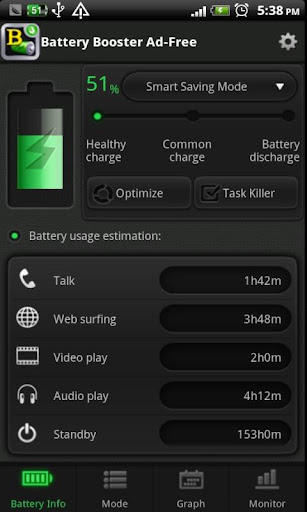
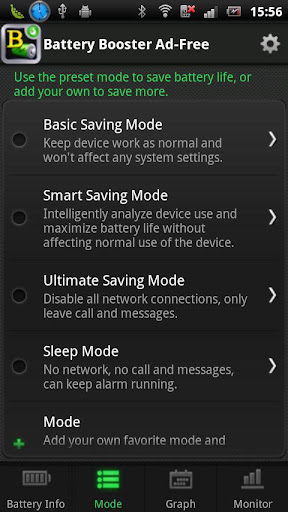
Based on system specifications, Battery Booster provides the most accurate information on your battery charge, which includes an auto-updating live chart visually tracking your battery usage, and the real-time battery capacity, temperature, voltage, etc. Battery Tweak, including Smart Battery Saver and convenient settings for managing Wifi & Bluetooth, can help to squeeze out the peak performance from your phone.
Battery Booster is a powerful battery boosting tool and power management application specially designed for Android devices.
Battery Booster is a powerful battery boosting tool and power management application specially designed for Android devices.
Features :
- Real-time battery status (capacity, temperature, voltage, and charging status, etc) monitor and battery usage tracking
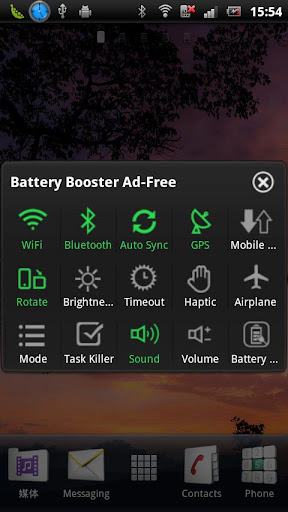
- Homescreen widget support (Add to homescreen with Menu -> Add -> Widgets -> Battery Booster)
- Shortcuts to WiFi/Bluetooth/Screen Brightness/Screen Timeout settings
- Real-time battery use monitor and management to save more power
- Battery Calibration Notification to maximize your battery life span
- Settings to automatically turn off WiFi/Bluetooth when device is locked.
- Settings to automatically turn on WiFi/Bluetooth when device is unlocked.
- Settings to automatically turn off WiFi/Bluetooth when your battery is low.
- Settings to enable beep and select beep tone/interval when your battery is low.
- Settings to enable beep and select beep tone/interval when your battery is full.
- Settings to enable beep and select beep tone/interval when your battery is overheated.
- Save more battery with built-in smart task manager (Based on Memory Booster - Android RAM Optimizer)
- Change splash screen
- UI Improvement
- Resolve reported issues
- Source code optimization
- Other minor enhancements
Required Android O/S : 1.5+
Screenshots :
Screenshots :

Download :3Mb APK
Tag :
Apps,
Start menu for Android v1.2.3 APK

Now on Android, use the 'Start' menu of MS Windows!
Start menu for Android play.google.com.ss.start
This application is designed by a motive from the 'Start' menu for Windows series.
Have you ever had some difficulties to search or manage applications installed on your device?
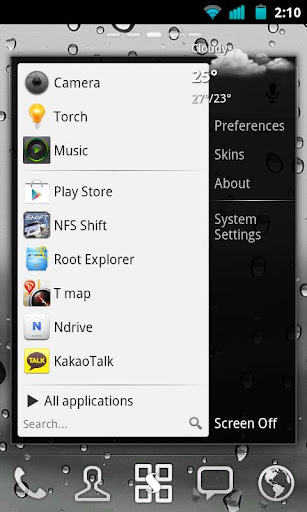
This app supports very similar user interface to 'Start' menu of MS Windows. So you can search and manage all applications easily.
Have you ever had some difficulties to search or manage applications installed on your device?
This app supports very similar user interface to 'Start' menu of MS Windows. So you can search and manage all applications easily.
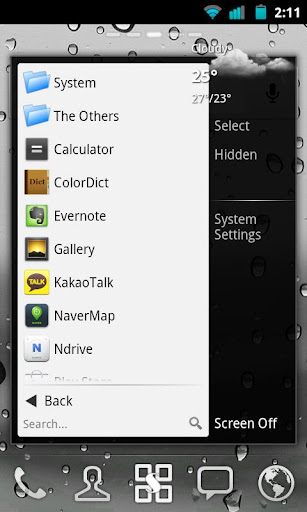
Also, you can categorize your all installed apps to folders and create shortcut to a folder or a predefined group such as starred, hot, hidden and more. Other folder management apps are no more needed!
The application drawer will be successfully replaced by this.
Features:
- Very similar UI to Windows Start menu
- pin apps to the favorites list
- hot apps list
- decorate panel by adding a widget
- hide, app info, uninstall, folder for apps, shortcuts and activities
- create shortcut to folder or more.
- various skins: Windows 7, Windows XP, Mac OS...
- fixed the bug that new shortcut or activity cannot be added
Required Android O/S : 2.2+
Screenshots :
Download: 260Kb APK
Themes:
- Windows 7 skin for Start menu v2.0
- Windows XP skin for Start menu v2.0
- Mac OS skin for Start menu v2.0
Tag :
Apps,